
Cabinet Navigation
Main section of the project cabinet
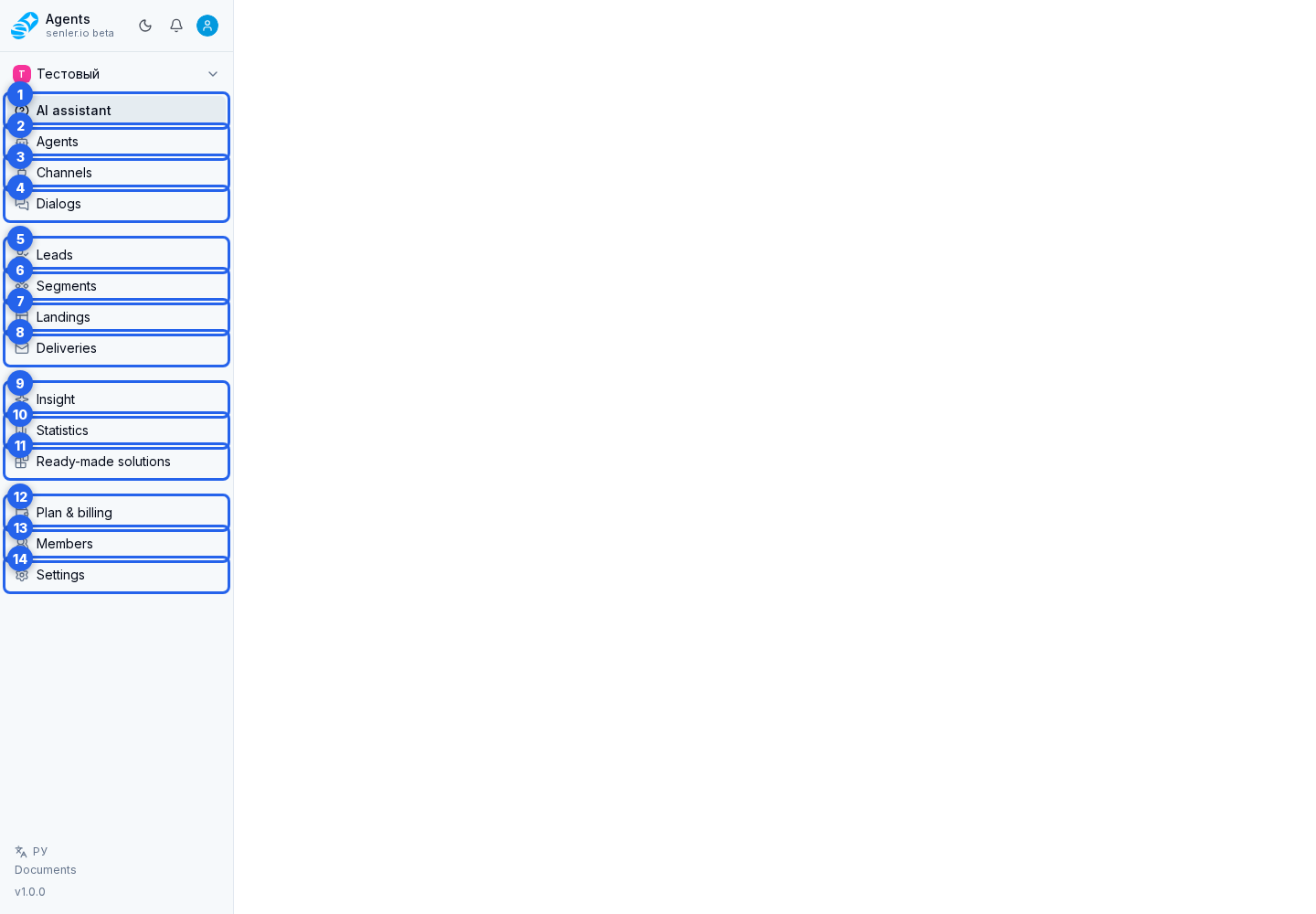
- "AI assistant" - the project start page and a chat with the cabinet assistant.
- "Agents" - creation and configuration of AI agents.
- "Channels" - connecting and configuring communication platforms.
- "Dialogs" - customer and operator conversations with AI.
- "Leads" - the customer list and lead cards.
- "Segments" - lead grouping, required consents, and agent assignment rules.
- "Landings" - subscription page, button, and channel link creation.
- "Deliveries" - creating and sending messages to project audiences.
- "Insight" - interpretation of quality metrics, problem areas, trends, anomalies, and the AI summary.
- "Statistics" - the numeric project picture: spend, messages, dialogs, leads, channels, and agents.
- "Ready-made solutions" - applications and prepared scenarios that can be installed in the project.
- "Plan & billing" - plan, balance, credits, and transactions.
- "Members" - the project team, roles, invitations, and channel access.
- "Settings" - project settings, API, MCP, instructions, variables, history, audit, processes, and storage.
The available items depend on the member's permissions. If a section is absent, check access to it. Use the exact item name when looking for a section in the sidebar.
Choose the required section in the project menu. If the menu is collapsed, first select the button that opens the menu.
Inside "Settings" there are subsections
- "General" - name, avatar, project language, API keys, and attachment limits.
- "Support" - operator schedule and response SLA.
- "MCP Servers" - connecting external tools.
- "Knowledge Base" - folders, files and tables with materials for agents.
- "Variables" - project variables and definitions of lead variables.
- “History” - events, messages, tools, errors, metrics, rollbacks.
- "Change log" - audit of changes to settings and entities.
- "Processes" - background tasks.
- "Storage" - file storage usage and limits.
- "Copy Links" - access to resource packages shared through links.
Account section
- "Account" - login methods and linked providers.
- "Notifications" - notification channels and notification settings for projects.
- "Documents" - user agreements, policies, and other legal documents.
Developer section
- "Description" - an overview of opportunities for developers.
- "Applications" - OAuth applications and ready-made solutions.
- The application provides general settings, OAuth, versions of a ready-made solution and webhooks.
Where this is in the interface
Main elements in this section:
- project sidebar
- button that opens a collapsed menu
- AI assistant item in the side menu
- Agents side menu item
- Channels item in the side menu
- Dialogs item in the side menu
- Leads item in the side menu
- Segments item in the side menu
- Landings item in the side menu
- Deliveries item in the side menu
- Insight item in the side menu
- Statistics item in the side menu
- Ready-made solutions item in the side menu
- Plan & billing item in the side menu
- Members item in the side menu
- Settings item in the side menu
- project settings page