
Storage
How to open Storage
Select the Settings gear button to the right of the project name, then select Limits. In the Storage block, select Details.

On the Storage page, the top summary shows the tariff, used space, total limit, available space, and usage percentage.
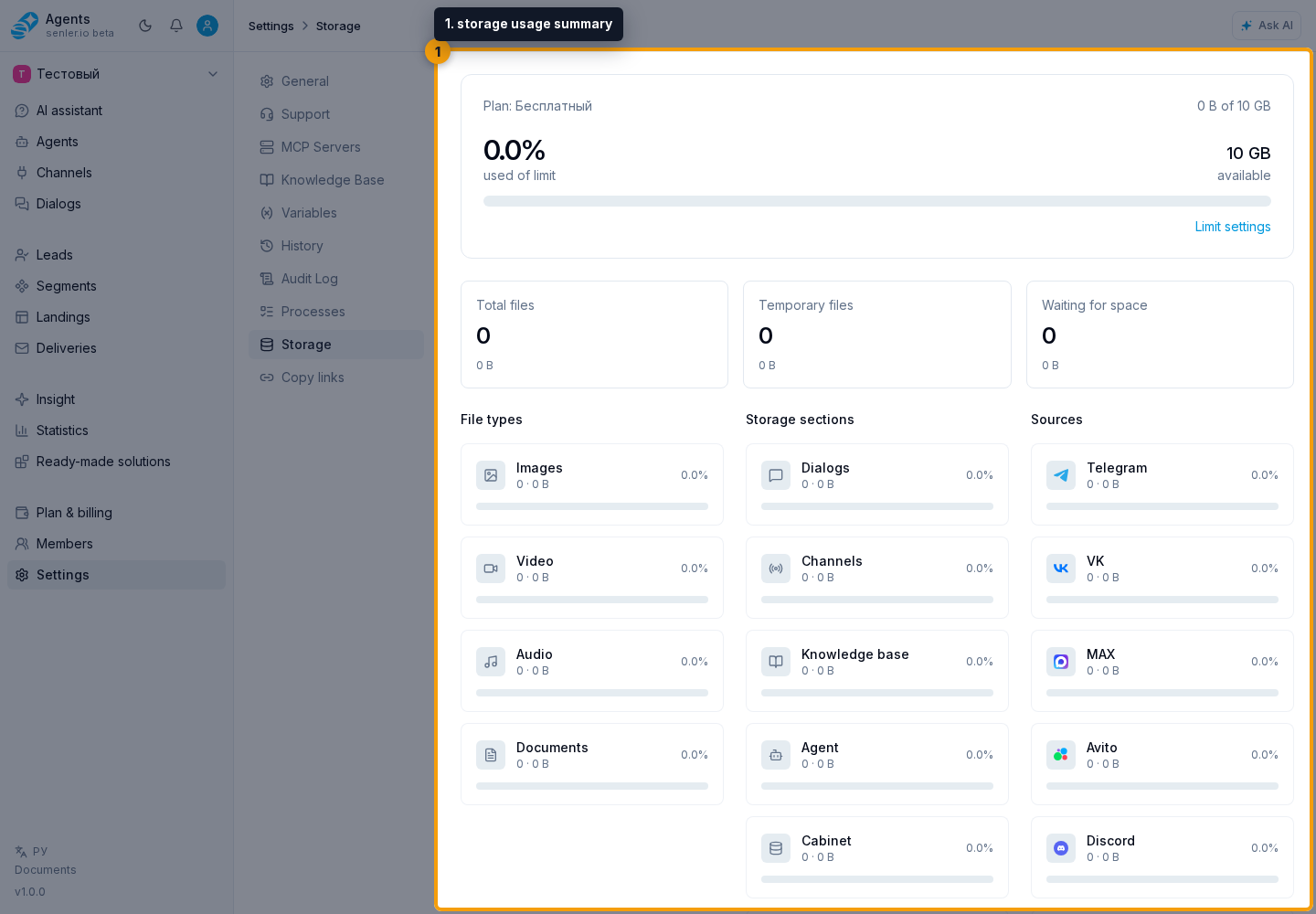
Below it are three counters:
- Total files — the number and total size of accounted files;
- Temporary files — the number and size of temporary files;
- Waiting for space — message attachments not yet counted against the quota.
The page shows aggregated statistics, message attachment storage settings, and attachment limits. It has no individual file list or manual delete action.
How to read the breakdown
Each row shows the file count, size, and share of the total used space. The data is grouped in three ways:
- by file type: images, video, audio, and documents;
- by storage section: dialogs, channels, knowledge base, agent, cabinet, temporary, and system files;
- by source: Telegram, VK, MAX, Avito, Discord, Widget, Email, Web, AI, and StreamVi.
Zero-value categories are also displayed, so the rows help explain where project usage comes from.
One incoming file can appear in several messages while taking up space only once. Senler reuses the saved copy within the same project and channel when the platform can unambiguously identify the same file and variant. A matching name or URL is not enough: not every resent attachment is combined. The storage file count can therefore be lower than the attachment count in conversations.
Limit warnings
At 90% usage, an “almost full” warning appears and new attachments may be queued. If the limit is exceeded, manual uploads are blocked and message attachments wait for available space.
When attachments are waiting, a separate block shows their count and combined size. After space becomes available or the limit increases, uploads requested within the past 7 days are retried automatically. Older files can be loaded manually from their messages if the source is still available. Renewing a plan alone does not increase storage capacity or start loading the entire archive.
If an upload reports that message attachment or important file storage is full, check that group’s limit and usage. Free space in the other group is not used automatically. The Open storage button in an automation attachment upload error opens this page in a new tab. Adjust the split, free up space, or increase storage capacity in plan settings, then retry the upload. Increasing the permitted size of one attachment does not increase the project's total storage capacity.
How to allocate space and enable automatic cleanup
By default, storage is split equally for both new and existing projects: 50% for message attachments and 50% for important files. Automatic cleanup of message attachments is enabled. Files are protected from automatic deletion for 24 hours after a successful upload. For existing projects, the service first calculates usage, then separately enables category limits and automatic cleanup. Until activation, the total limit applies. Calculation itself does not delete files.
Message attachments include received and sent files, including agent replies. They always have at least 30% of storage; the slider cannot select a smaller share. This 30% is shown in gray on the left.
- Set the message attachment share with the slider. The remaining share is for important files: the knowledge base and working settings, such as files in automation steps. Each group is limited to its own share and cannot use the other group's space.
- Enable Clean up message attachments when 90% full to free space in advance when their share reaches 90% usage. If a new message attachment fits within its share but there is not enough free space for it, cleanup can start earlier.
- When reducing the message attachment share or enabling automatic cleanup, the estimate of deletion after saving appears automatically. Review it before saving. Calculating the estimate does not delete any files.
- Click Save. Updating these settings requires permission to manage the project.
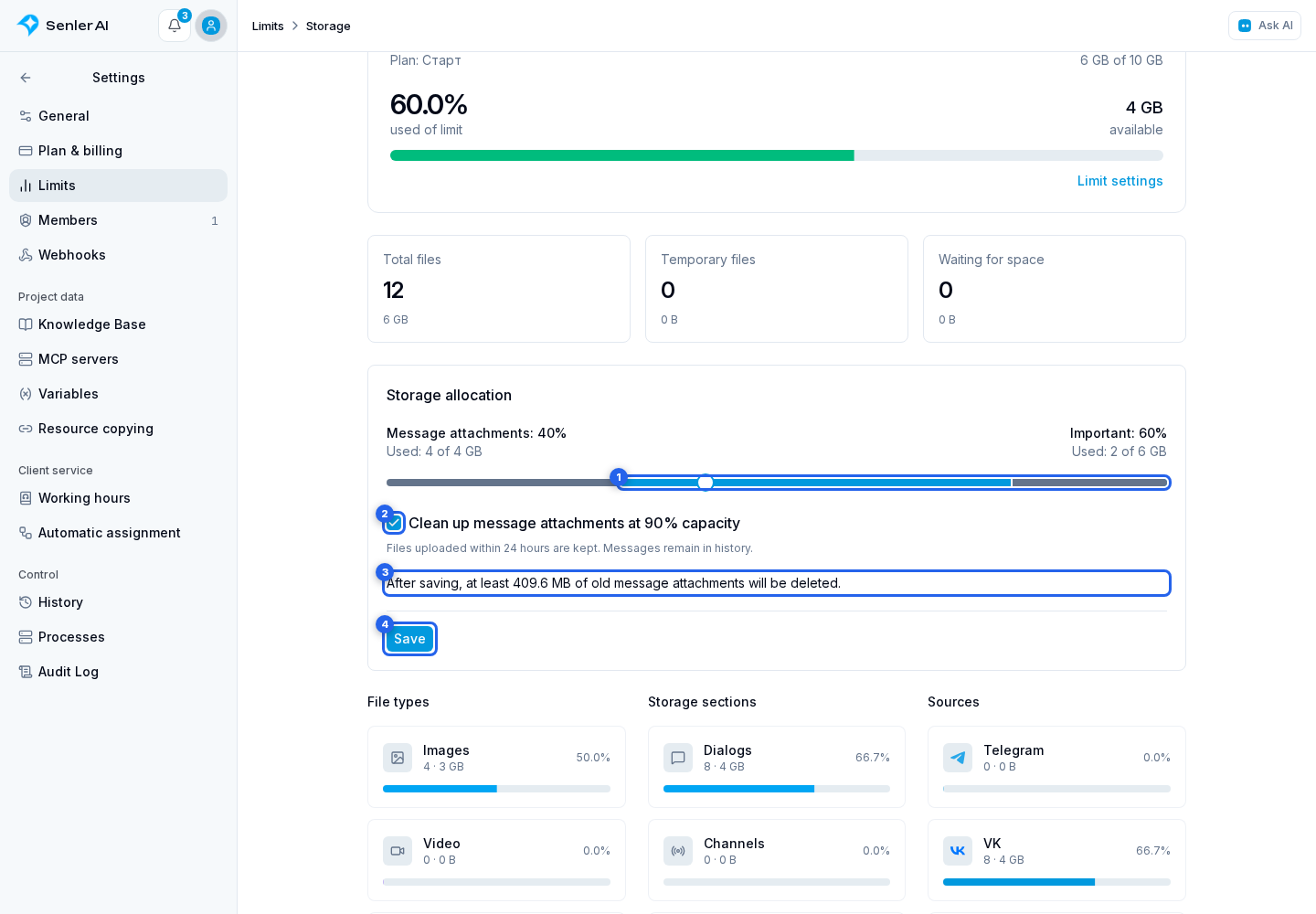
Both groups show “Used: X of Y”. Used space includes space for ongoing uploads. If a number is unknown, an icon appears in its place. It spins only while calculation is running. A clock means calculation has not started; an exclamation mark means it could not be completed. Hover over the icon for an explanation. If the state remains unchanged for a long time, contact support.
The important file share cannot be reduced below its used space, including ongoing uploads. The gray section on the right shows the minimum selectable share for important files. For example, if the slider allows no less than 5%, the entire 5% is gray. Click the section for an explanation. While usage by category is unknown, free space can already be allocated to message attachments. Enough space for all files and ongoing uploads is temporarily kept for important files.
When reducing the message attachment share or enabling automatic cleanup, review the estimate before saving:
- If enough files are eligible, the form shows the minimum amount to be deleted after saving. Whole files are deleted, so the final amount can be larger. Cleanup stops when message attachments use less than 90% of their share.
- If there are not enough old files, the form shows the available deletion amount and a warning. If there are none or cleanup is unnecessary, the form says so.
- If only some files have been checked and they are insufficient for an estimate, the form shows the space that needs to be freed. This is the cleanup target, not a promise to delete that amount immediately.
- The estimate is based on current files and changes with new uploads. Files uploaded within 24 hours are kept.
If the share is at least 90% full, saving with automatic cleanup enabled starts deletion of eligible old message attachments. With automatic cleanup disabled, files remain; if the share is full, new uploads wait for free space.
The upload limit becomes 10 GB as soon as the subscription ends. Existing files above this limit are kept for 90 days from the subscription end date. The excess is then removed: old message attachments are removed first, followed by uploaded knowledge-base files, starting with the largest. This rule also applies when automatic message attachment cleanup is disabled. The storage shares do not determine the order of this deletion.
Files used by automations, working mailings and installed apps are kept. Files younger than 24 hours are also kept. If protected files occupy more than 10 GB, they remain in storage; new uploads wait for space or subscription renewal. Files are deleted in full, so the remaining volume can be less than 10 GB.
The form shows the cleanup start date and limit without a subscription and hides the normal cleanup estimate. Renewal stops cleanup under the 90-day rule. The shares and automatic cleanup setting are preserved; further message attachment cleanup depends on usage against the restored limit.
Cleanup starts with message attachments uploaded the longest ago that are at least 24 hours old. Age is measured from the last successful upload to storage, not the message date. Loading a file again from history protects it for another 24 hours. Files used as working files are excluded from cleanup. The message and existing recognition results remain available. Deleted copies are not reloaded automatically; use loading from dialog history when needed.
When importing into the knowledge base, the source attachment is protected while it is being copied. Once a separate working copy exists, the source file becomes eligible for normal cleanup again unless it is used elsewhere.
If the message attachment share is already exceeded, new message attachment uploads wait for space. Automatic cleanup frees space gradually; it cannot guarantee free space when every file was uploaded less than 24 hours ago or is protected.
How to configure attachment limits
If the member can update the project, the top card includes a Limit settings link. Click it to open the form.
The form contains:
- a global file size limit;
- separate limits for VK, Telegram, MAX, Discord, Widget, StreamVi, Email, and Avito;
- Reset and Save buttons.
Each filled value must be from 1 to 500 MB. An empty channel field inherits the global limit. Reset restores the values currently saved in the project; Save applies the current form.
If the Limit settings link is absent, the member can view statistics but cannot update the project.
If attachments are not uploaded
- Check the warning and available space in the top summary.
- Compare the file size with the global limit and the limit of the relevant channel.
- If the file is in Waiting for space, also check the message attachment share. For an old request, load the file manually from its message.
- For an access error involving a specific attachment, use the diagnostics in Attachments and voice messages.