
Lead JWT for a Custom MCP
Choose a Lead Account
Open your custom server in the project's MCP servers.
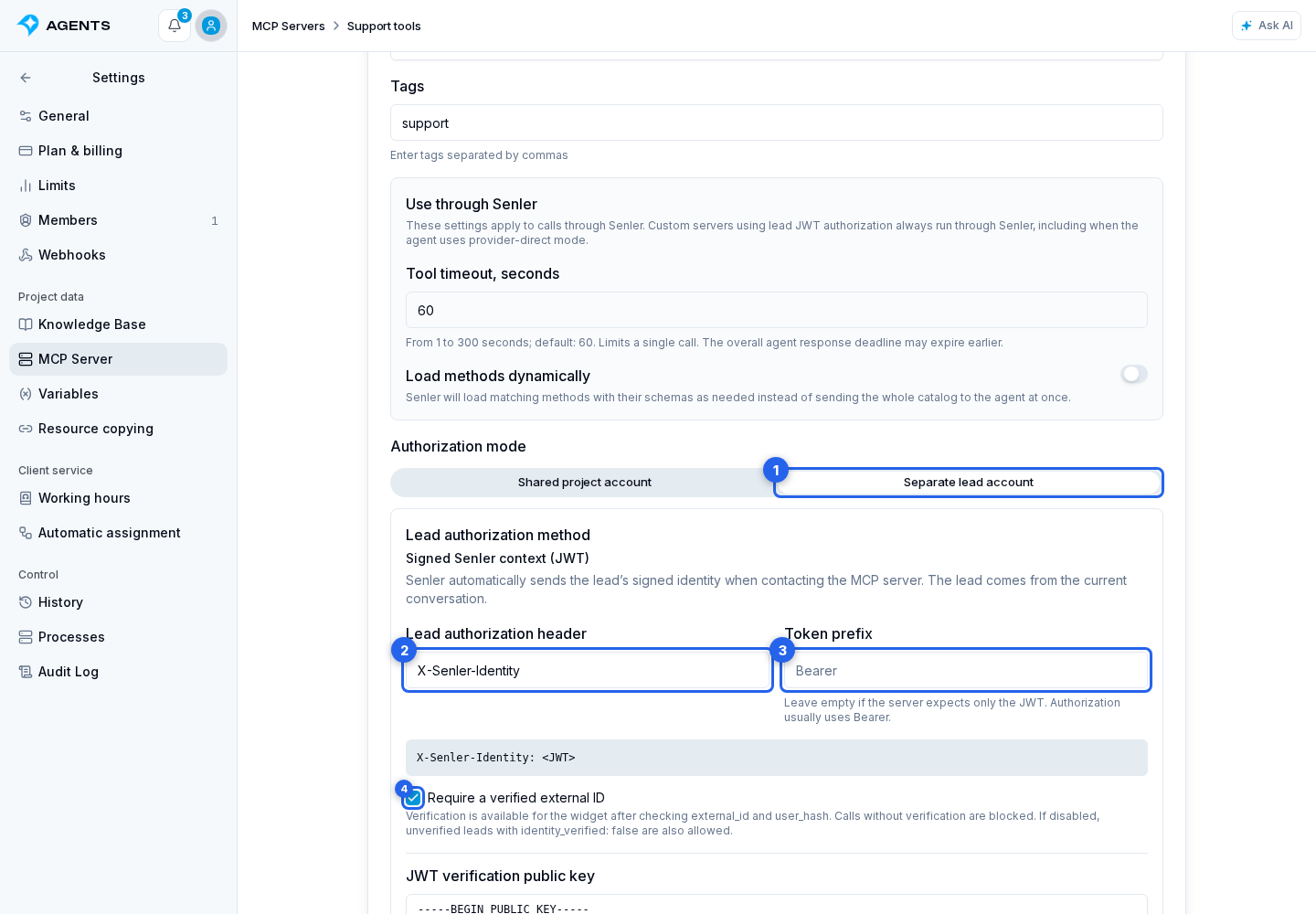
In custom MCP settings, select Separate lead account.
Separate lead account uses the Signed Senler context (JWT) method. Senler identifies the lead from the current conversation context and automatically issues a short-lived JWT for the selected MCP connection. Enter your MCP server’s HTTPS URL.
The Lead authorization header defaults to X-Senler-Identity. You can leave Token prefix empty. If your server expects Authorization: Bearer <JWT>, enter Authorization and Bearer. You do not enter the token itself.
The authorization modes are mutually exclusive: when you choose a separate lead account, Senler uses the automatically generated lead JWT for authorization. The shared project account’s token and secret headers are not used in this mode. Saving a different mode replaces the previous authorization settings.
The service header X-Senler-MCP-Context is sent with any authorization mode. It confirms the origin of context without enabling a second account or replacing the lead JWT. Its format and verification are described in Signed context for MCP requests.
Verify the User
Require a verified external ID is enabled by default. Verification is available for widget messages after server-side validation of external_id and user_hash. Older or anonymous sessions must be initialized again with a signed identity. A lead record or an ID in tool context alone does not verify an external account. For other channels, this method sends the lead record with identity_verified: false if the verification requirement is disabled.
If the required verification is missing, this MCP’s protected tools are unavailable. The agent can continue the conversation and use other tools; for actions involving personal data, it will ask you to authorize. It does not switch to the shared project account.
After saving, copy the JWT verification public key and the iss and aud values to your MCP server. Senler creates a separate key for each connection. The private key is encrypted at rest and is not returned by the API or exports. Imports create a new key, which you must configure again on the receiving server.
Verify the JWT on the Server
The JWT uses ES256, has type senler-lead+jwt, and lasts 5 minutes. It contains sub / lead_id, project_id, channel_id, channel_type, external_id, identity_verified, identity_source, mcp_server_id, iat, exp, jti, iss, and aud; dialog_id and agent_id are added when available, and verified identities include verified_at in Unix seconds. aud is the HTTPS MCP URL without query parameters. Validate the signature, allowed algorithm, type, expiration, and expected iss and aud, then map the account using the project, channel, and external ID and check permissions for each action.
verified_at records external ID validation during widget session initialization, rather than a new website login for each call. Your API must check the account’s current status and permissions. A short JWT lifetime does not revoke an existing widget session.
Lifetime and Subsequent Calls
A custom MCP server using lead JWT always runs through Senler, even when the agent is set to Directly through the AI provider. Senler creates a new JWT before each call. For example, the token for a call at 12:00 expires at 12:05, while a call at 12:06 receives a new token valid until 12:11. The lead does not need to sign in again. The agent’s other servers keep their selected execution mode.
Run authorization context is stored for at most one hour. Missing, expired, or mismatched context blocks the call without falling back to the shared project account. Check JWT expiration when accepting the request: an accepted operation need not be cancelled because its signature expires later. Set the timeout for each tool in the connection settings.