
Subscription and add-ons
On the billing page, you can review your subscription, renew it, or change the project's limits.
- Select the Settings gear button to the right of the project name.
- Open Plan & billing.
Current configuration
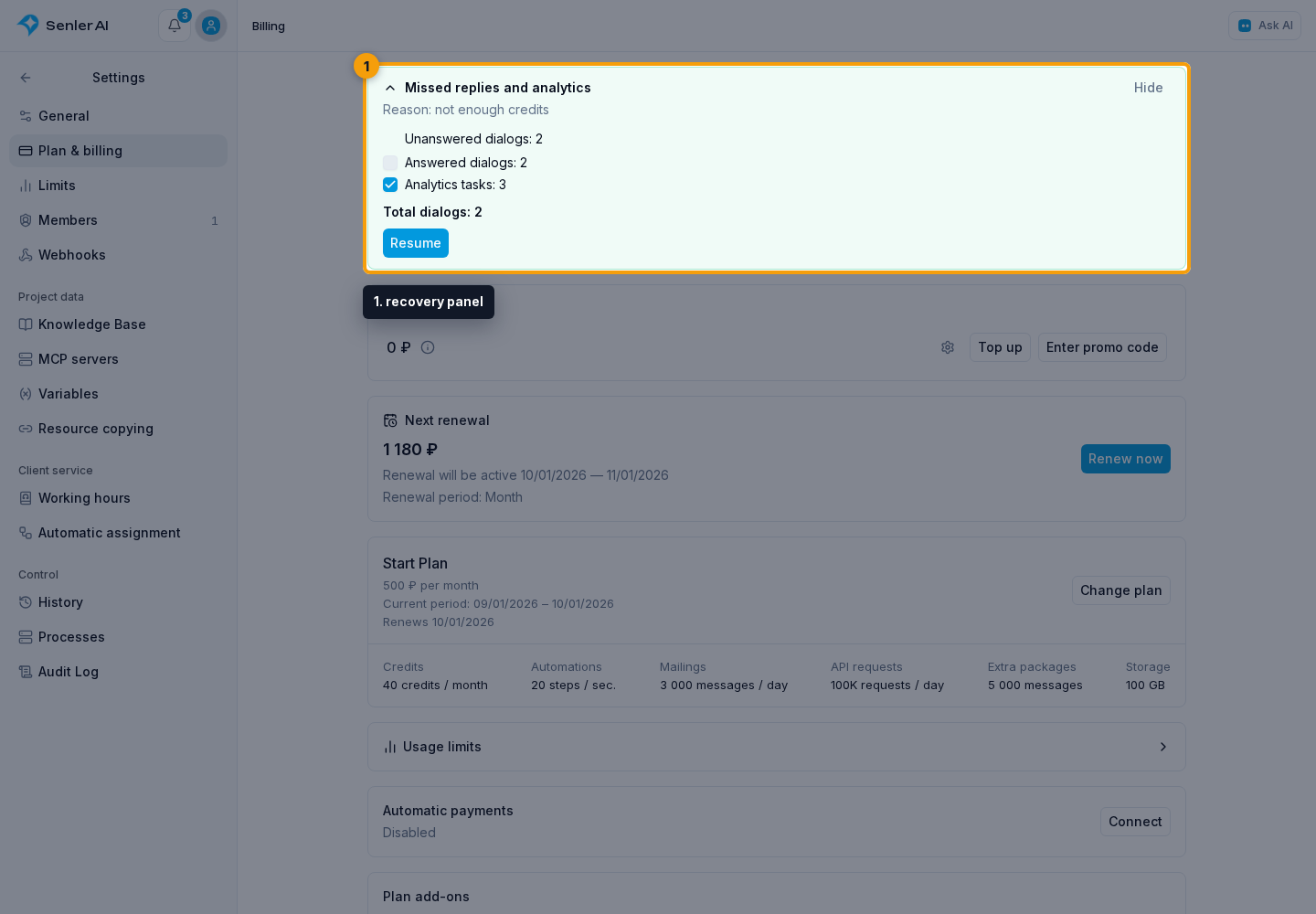
The Next renewal card shows the shared date, period, and price of the plan together with all bound recurring limits. Renew now opens a calculation for the full configuration, not for an individual add-on.
The current plan card shows its term, renewal state, base limits, and active recurring increases. Select Change plan to open the shared table and build a new subscription composition.
The Plan add-ons section offers one-time credits and messages; if previously purchased, their remaining amount is shown. Plan-bound limit increases are part of the current configuration and are not repeated here.

Next renewal
Select Renew now in the Next renewal card.
In the renewal dialog:
- Choose a month or a year.
- Review the subscription items, next period dates, and amount.
- Choose whether to use the balance of the project for payment.
If the balance covers the full amount, confirm with Renew. If an additional payment is needed, click Proceed to payment.
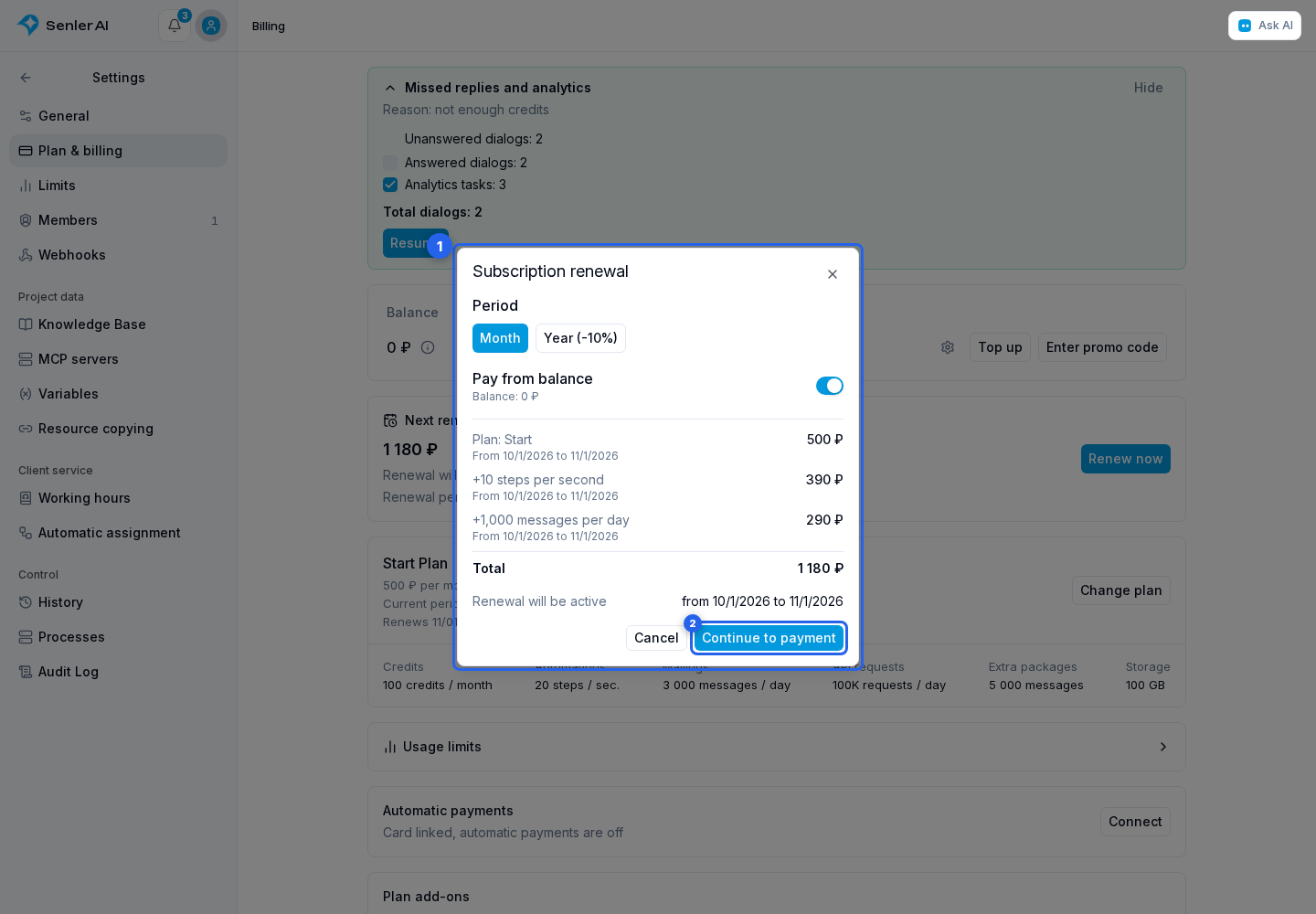
On the payment step:
- Choose a card or one-time payment.
- Use the payment or renewal button.
Back returns to the calculation without paying; on the first step this button is called Cancel and closes the dialog.
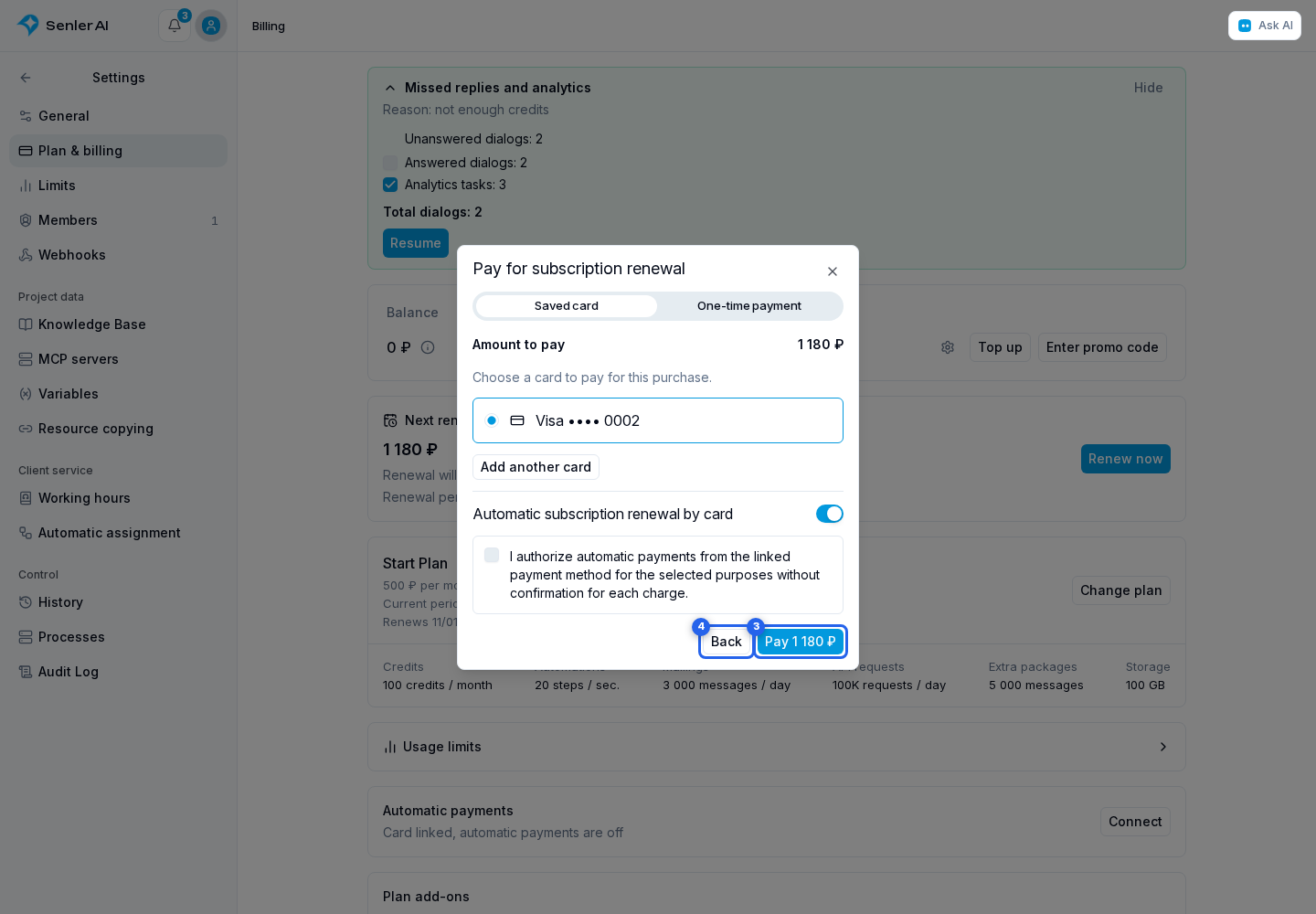
Payer settings are requested when external payment is needed, not to view the calculation.
Confirmation applies to the displayed dates, subscription composition, and payment amounts. If autopay has already paid for that period, the cabinet reports this without making another purchase. If the calculation changes, refresh it and confirm payment again. The “Pay now” button in a notification opens the renewal that the message refers to.
The “Cancel renewal” button on the Plans and limits page disables subsequent renewals. The plan and add-ons remain available through their paid-through date, including any prepaid period. Ordinary renewal cancellation preserves prepayment and does not refund money to the balance.
Separately canceling a prepaid future period returns its cost to the balance and disables further renewal. This refund is available only before that period starts: the current period remains active and is not refunded. When upgrading the plan, prepayment is automatically credited toward the new purchase; there is no need to cancel it separately before paying.
Plan-bound limits
The following recurring increases are bound to the plan:
- monthly credits;
- automation step speed;
- daily mailing limit;
- daily API quota;
- storage.
They always have the same monthly or annual term as the plan. The cabinet does not offer a separate purchase, renewal, or term change for one of these items. When making a change, therefore, review the entire composition: plan, shared period, and every selected increase.
Within the same plan, a more expensive configuration or one with the same price takes effect immediately with an adjustment for unused paid value. A cheaper configuration, a move to a lower plan, or a switch from annual to monthly billing is scheduled for the end of the paid period. Price comparison and mixed changes are described in When a change takes effect.
One-time purchases
One-time credits and mailing messages are purchased in Plan add-ons and are outside the shared subscription term. In the purchase dialog, choose an amount, check the price, and confirm payment from the balance or through a payment system. See Buying a credit package for step-by-step instructions with screenshots.
Remaining one-time credits and messages do not expire when the period ends or the plan changes. Credit prices depend on the active plan: packages cost less on Large Agent than on Start.
Scheduled changes
A scheduled change is stored as one complete future configuration. The panel shows the switch date, new period, composition, and price. On the switch date, Senler attempts to pay for the whole configuration from the project's monetary balance.
Canceling a scheduled change removes the upcoming switch to another configuration. Already paid periods and the auto-renewal setting are preserved. To disable further subscription renewal, use “Cancel renewal” on the Plans and limits page.
Own AI accounts
On Large Agent, you can connect OpenAI or OpenRouter and separately enable your own keys. Requests through them are billed by the provider. Switching to Senler accounts when your own are unavailable is controlled by a separate switch and consumes Senler credits.
Connections are in Settings → General. See Own AI accounts for connection steps, status checks, and the effects of disconnecting.
If an agent missed replies because of billing
If billing issues left missed replies or waiting analytics, the recovery panel appears at the top. After payment, select the answered dialogs and analytics tasks to include, check the dialog total, and press the start button. Unanswered dialogs are included automatically. See Recovering missed replies.
Viewing the page requires billing view permission. Purchases and changes require project billing management permission.