
Agent Response Preparation
Open the conversation in the dialog list.
Agent response preparation stages
While the agent is working on a response, the open chat and dialog row may show the current understandable stage: “Thinking…”, “Searching for information…”, “Working with an external service…”, “Analyzing an attachment…”, “Creating an image…”, “Creating audio…”, “Preparing the result…”, “Preparing an attachment…”, “Performing an action…”, or “Finalizing the response…”.
If preparation takes five minutes or longer and continues to update, the status changes to “The response is delayed; processing continues”. This is a duration warning, not an error or confirmation of delivery. Check progress in the AI events next to the message.
The status describes the agent's current work. The final text appears as a separate message; check its delivery in Message Information.
When an automation step starts the agent, this group includes an “Automation passed a request to agent” event with the agent's name. It confirms that the command was passed to the agent, but it is not a customer message and does not confirm that the prepared response was sent. A result sent separately to the customer appears in the conversation as a regular message.
After completion, the event group may show “Response prepared”, “Failed to prepare response”, or “Response preparation canceled”. These entries describe the agent's work, not message delivery. Check the resulting message and its delivery status.
If a stage stops updating, the cabinet removes the stale indicator. When the problem repeats, check the connection and expand the response's technical events.
If An Agent Reply Is Cancelled
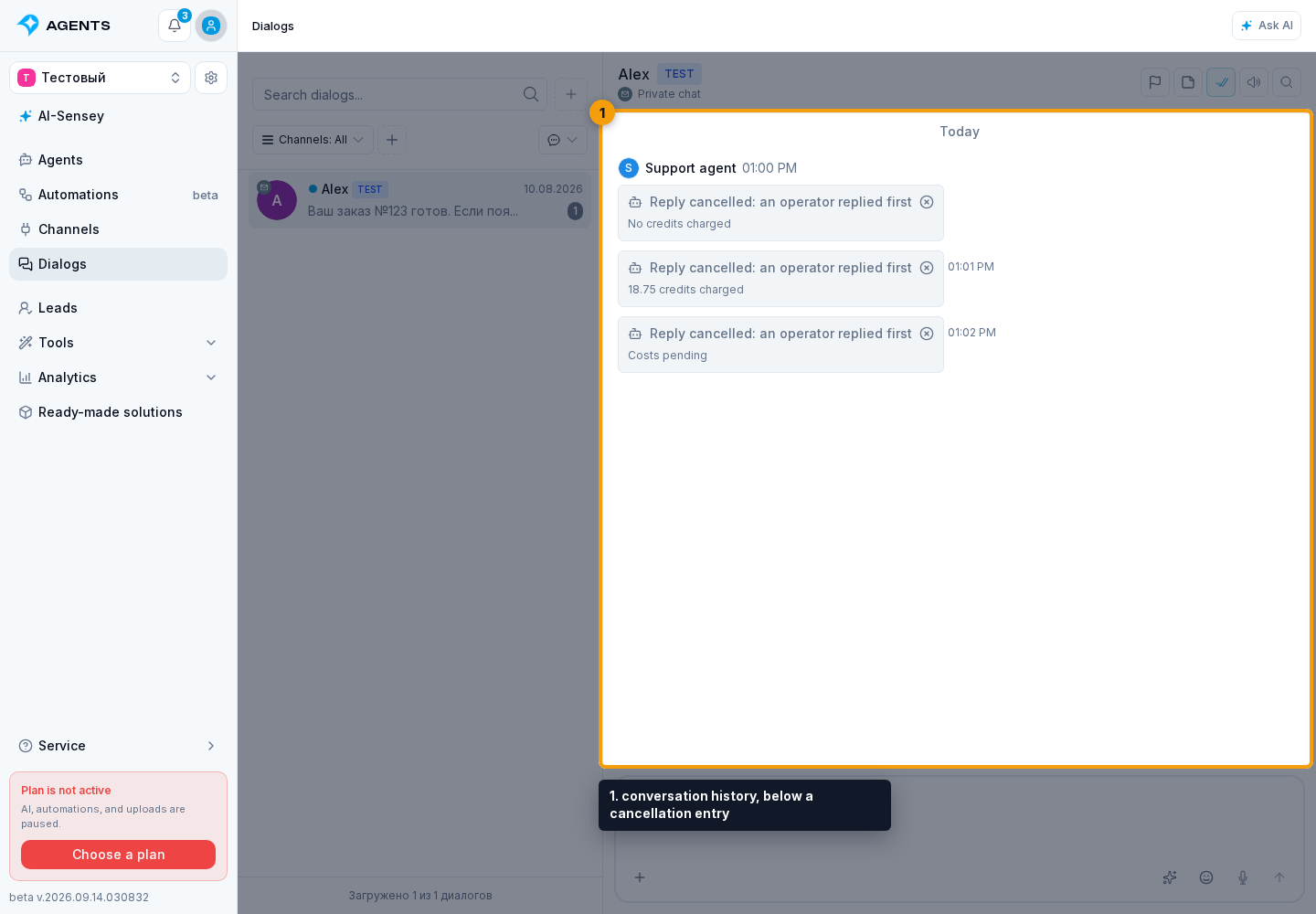
“Reply cancelled: an operator replied first” means that preparation of the agent's response was stopped after a reply from the project side. This is not a customer message or a delivery error. Cancelling preparation does not recall messages already sent.
In the conversation history, below a cancellation entry, a cost status may appear:
- “No credits charged”: the response was cancelled before preparation started.
- “… credits charged”: completed work on this response already has a recorded cost. This is not a separate cancellation fee.
- “Costs pending”: there is not enough cost information yet. Do not treat this label as confirmation of zero charges.
See event information for details and credit history for project charges.