
Custom subscription form
Add a form to a Custom HTML block and pass its values to SenlerLanding.subscribe. Phone and email are saved as lead contacts; other allowed fields are saved as lead variables. The lead is identified by a verified VK, Telegram or MAX account.
Allow groups and fields
- Open the landing settings → the Permissions tab.
- Find Segments under Permissions for HTML blocks. Click Add and select the segments visitors can subscribe to.
- Click the copy icon next to the ID below the required segment name. Paste that value into
segmentIdin your code.
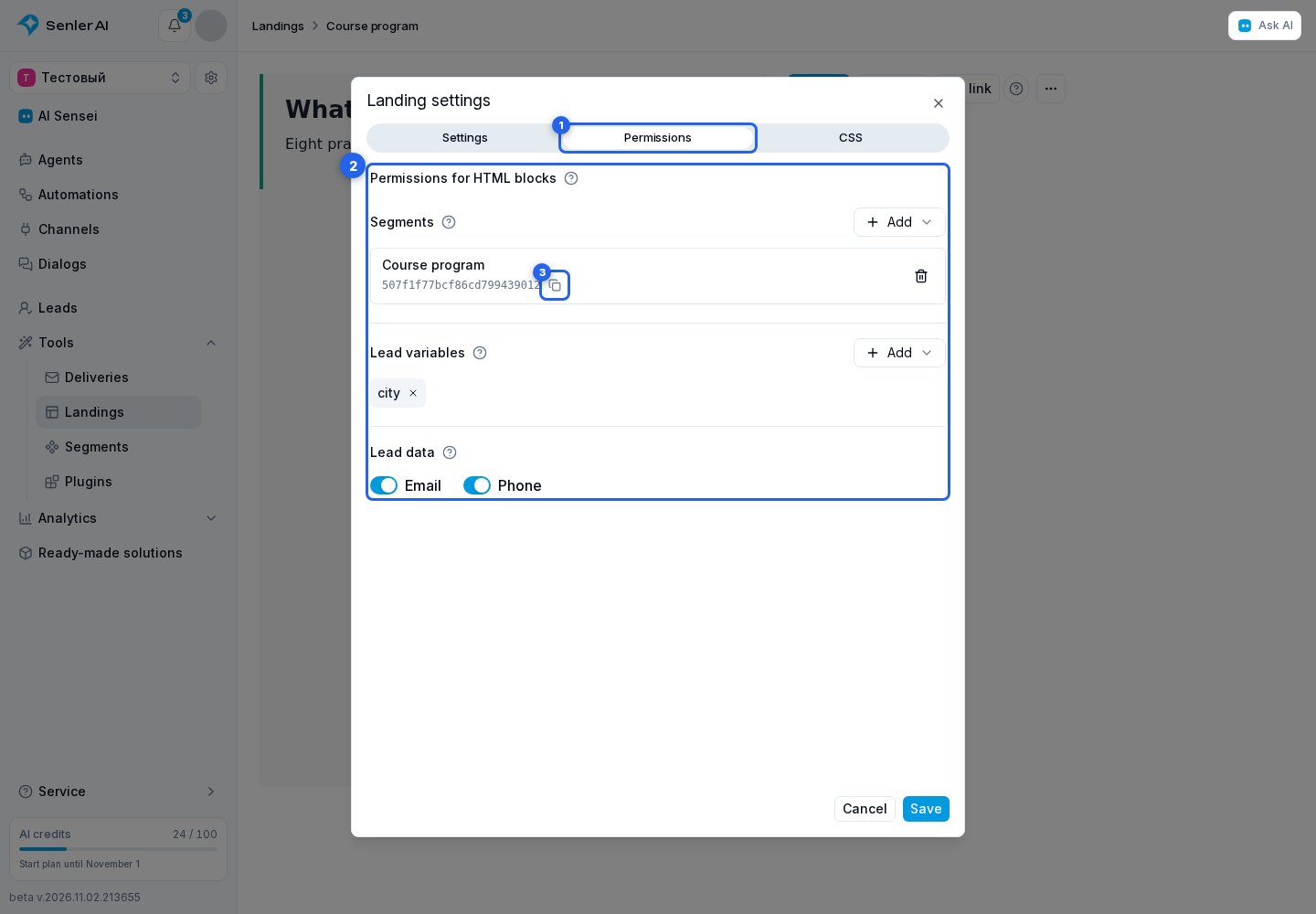
Under Lead data, enable Email and Phone if your form needs them.
To add a questionnaire field, under Lead variables, click Add and select an existing variable. For example, allow city for a city and age for an age. If the variable does not exist yet, create it in lead variable settings first.
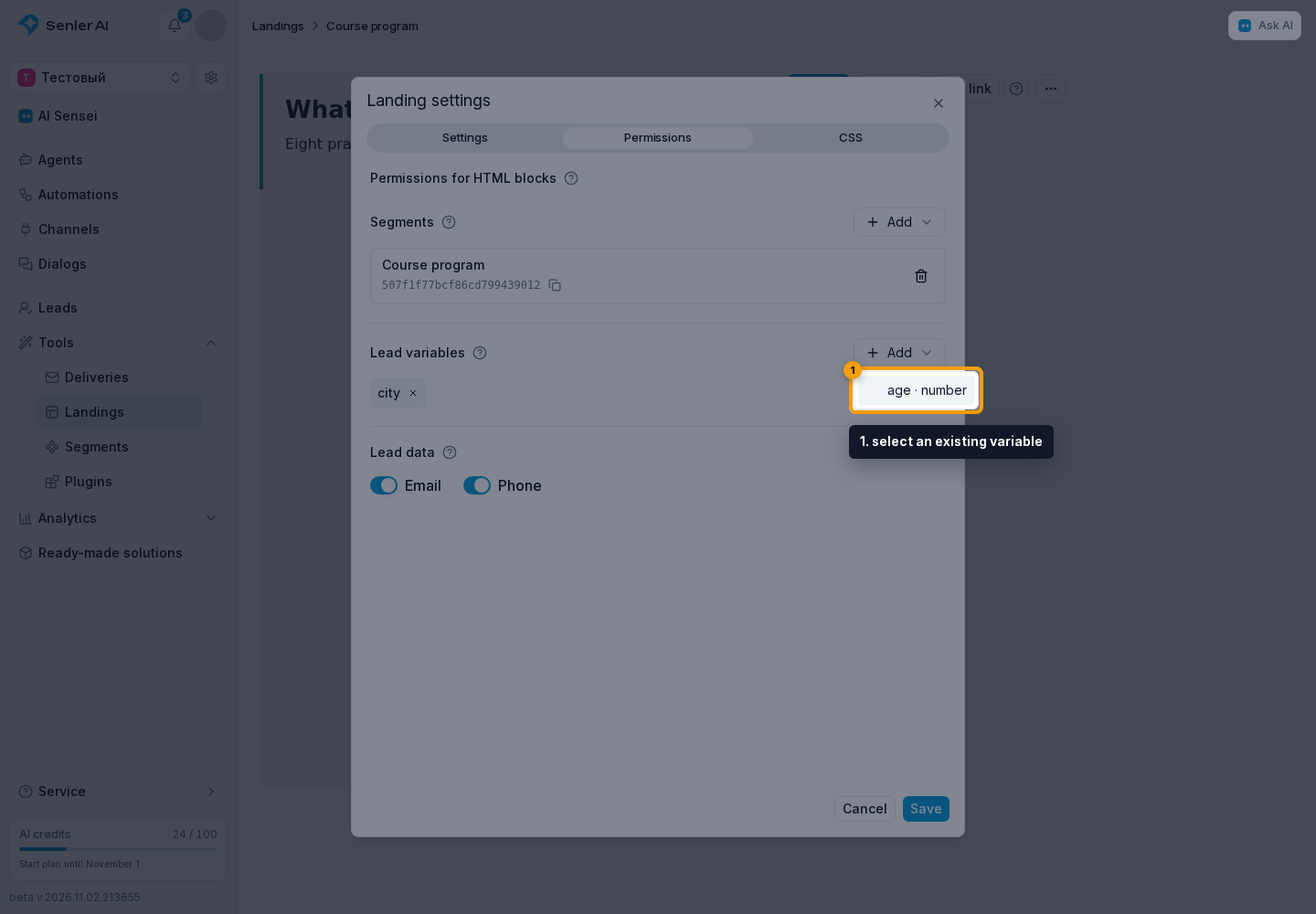
Variables and lead data are allowed once for the entire landing. You can configure them before selecting segments. Removing the last segment keeps the selected fields but disables SDK subscriptions.
The cross on a variable lets you remove it from the allowed list. The trash button beside a segment disables SDK subscriptions to that segment. Details are available through the help icon next to each section heading.
Save settings and publish the landing. SDK subscriptions are disabled while the group list is empty. You can allow up to 20 segments and 20 variables per landing. These settings allow fields to be written; they do not make fields required.
Visitors can change submitted values. Choose questionnaire fields such as city or interests. Do not allow form writes to variables that grant paid access, bonuses or permissions. Your server logic must verify these facts.
Add a form
For this example, allow phone and a string variable named city. Add this to the block's HTML tab:
<form class="signup">
  <label>Phone
    <input name="phone" type="tel" autocomplete="tel" maxlength="120" required>
  </label>
  <label>City
    <input name="city" maxlength="100" required>
  </label>
  <button type="submit">Get the program</button>
  <p role="status" aria-live="polite"></p>
</form>
Paste this into the JS tab, replacing SEGMENT_ID with the ID shown below the selected group name:
{
  const root = document.currentScript.parentElement;
  const form = root.querySelector('.signup');
  const button = form.querySelector('button');
  const message = form.querySelector('[role="status"]');

  form.addEventListener('submit', async (event) => {
    event.preventDefault();
    if (button.disabled || !form.reportValidity()) return;
    const data = new FormData(form);
    button.disabled = true;
    message.textContent = '';
    try {
      const result = await SenlerLanding.subscribe({
        segmentId: 'SEGMENT_ID',
        contact: { phone: String(data.get('phone')).trim() },
        variables: { city: String(data.get('city')).trim() }
      });
      message.textContent = result.status === 'redirected'
        ? 'Continue subscribing in the app.'
        : ['subscribed', 'already_subscribed'].includes(result.status)
          ? 'Done! Your details are saved.' : 'Subscription cancelled.';
    } catch (error) {
      message.textContent = error.message;
    } finally {
      button.disabled = false;
    }
  });
}
Add simple styling in the block's CSS tab:
:scope .signup { display: grid; gap: 16px; }
:scope label { display: grid; gap: 6px; }
:scope input, :scope button {
  padding: 12px 16px;
  border: 1px solid currentColor;
  border-radius: 12px;
  color: inherit;
  background: transparent;
}
The HTML form does not send a native request to action: its handler calls the SDK. The standard interface displays the group's required consents. A phone already passed in contact does not need to be entered again. Use contactCapture to request an allowed contact through the standard form when you do not provide your own field.
What the server checks
The server checks the published group list, allowed fields and variable types. Editing HTML or calling the API directly does not allow other variable writes or choosing another lead. Pass numeric variables as numbers, such as age: 25, and boolean variables as true or false; the string "25" is not a number.
One form submission is limited to 16 KiB. When opening a platform app, its values stay on the server for one hour; phone numbers and variable values are not placed in the URL. Fill the form again after that hour expires.
Contacts and variables are saved with the confirmed subscription before its automation starts. Repeating a subscription updates submitted fields but does not create another subscription event for an existing group member. Cancelling before confirmation does not write data to the lead. A transaction failure rolls back all of its changes.
Test the form through the published link. The cabinet preview shows fields and styles but does not execute JavaScript. Subscriptions on the public page are real.