
Booking Through an Agent
An agent can suggest a service and available time, book a client, reschedule or cancel their booking. It uses the same schedule and availability as the journal.
Enable booking
- Prepare services and schedules.
- Open the agent's tools.
- Under Online booking, click Configure.
- In the Online booking access dialog, set service access to All project services or Selected services.
- For Selected services, add the relevant entries in the Services field.
- Under Allowed actions, select the actions the agent needs: catalog and availability, creation, rescheduling and seat changes, cancellation, and waitlist management.
- Click Save, then publish the agent settings.
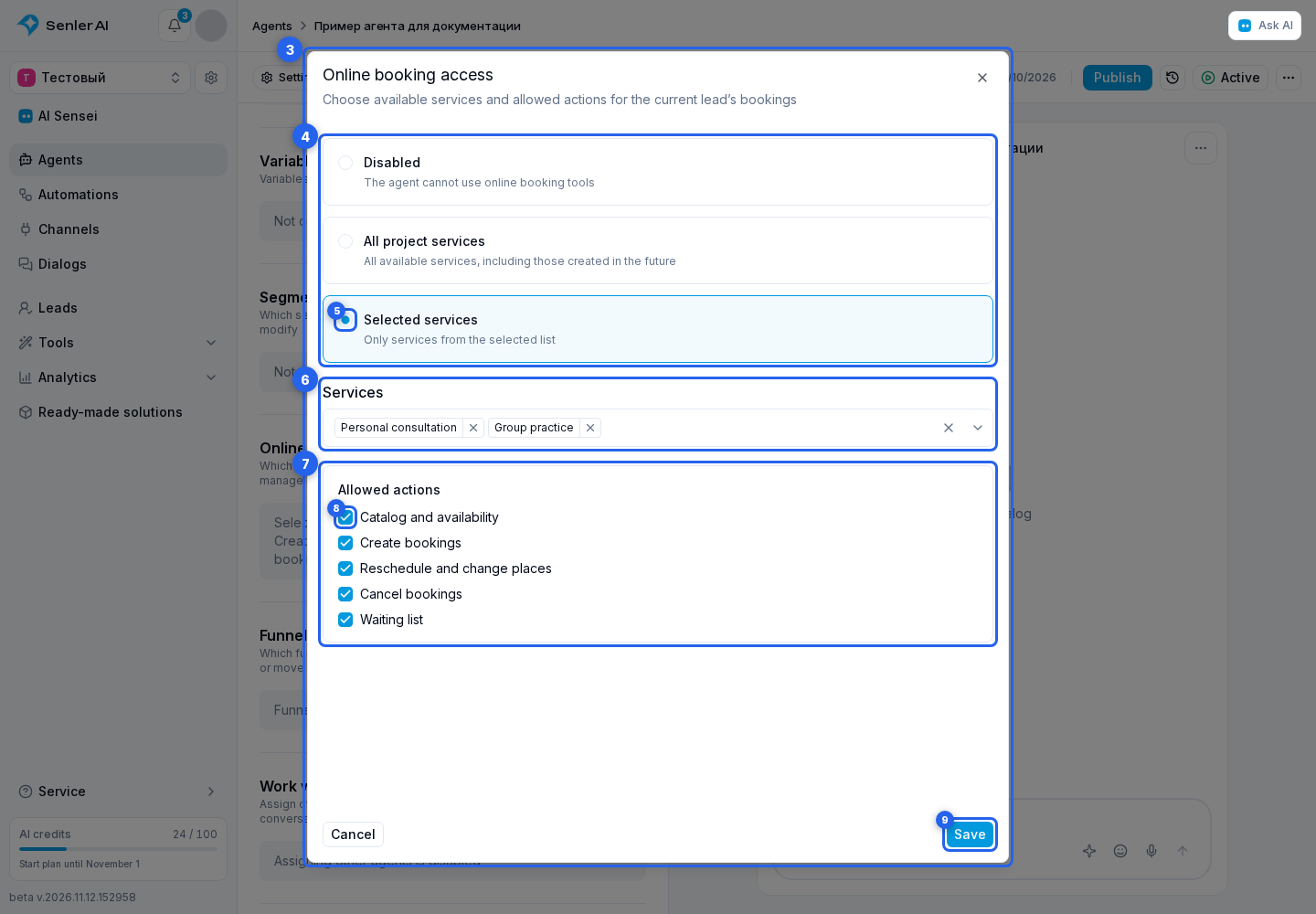
Disabled mode gives the agent no booking tools. Permissions can be granted separately: for example, allow availability lookup but not creation or cancellation.
What to put in the instruction
Describe when the agent should offer booking and what information to ask for. For example:
Help the client choose a service and time. Ask for their name, contact and number of seats. Before creating the booking, repeat the selected service, date, time and price. Report success only after the tool confirms the booking.
Tools provide the agent with the current catalog, specialists, days and times, sessions and client bookings. Do not manually list available hours in the instruction.
Limits and testing
The agent works with bookings belonging to the lead on whose behalf the action runs. In a group conversation, the action belongs to the selected participant, not the whole group. Service access is limited by the agent settings.
Rescheduling and cancellation through the agent respect the advance deadline. A waitlist request does not reserve a place. In Automatic mode, the agent must explain the condition and obtain the client’s consent. The join-waitlist tool accepts the session time the client agreed to book automatically; a separate tool records consent for an existing request, including after a session is rescheduled. Without consent, promotion remains manual.
In agent testing, mutation requests do not create real bookings. Do not present a test result as confirmation of a real visit.